Your agent talks to the public and handles customer data, so Buddy gives you controls at three levels: where the agent runs, who can use it, and what is stored. Agent-level controls are on each agent's Security tab. Workspace-level controls are under Settings.
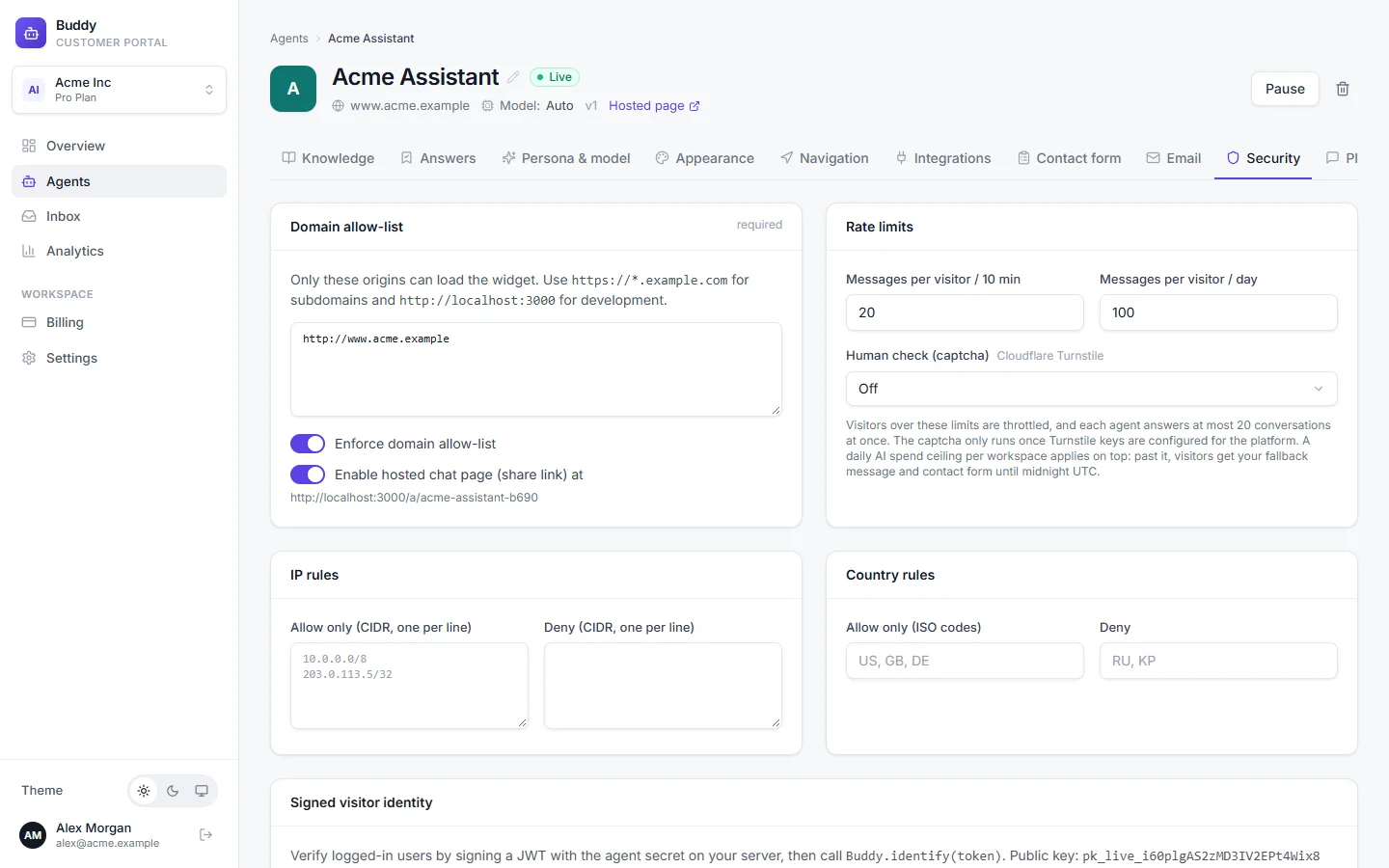
Domain allow-list
Only websites on this list can load your widget, so nobody can put your agent, and your message quota, on their own site. List one origin per line, including the scheme:
https://www.acme.example
https://*.acme.example
http://localhost:3000
https://*.acme.exampleallows every subdomain, andacme.exampleitself.httpandhttpsare different: list the one your site uses.- Local development needs an explicit entry such as
http://localhost:3000.
The same card has Enable hosted chat page (share link). Switch it off if you don't want the agent reachable outside your own site.
Rate limits and abuse protection
- Messages per visitor / 10 min
- Default 20.
- Messages per visitor / day
- Default 100.
- Human check (captcha)
- Off: never challenge visitors. When suspicious: only visitors whose IP hit a rate limit in the last hour. Always: every new visitor completes a check before chatting. A solved check lasts 12 hours.
On top of that, each agent answers at most 20 conversations at the same time, and visitors from one IP address are throttled if they send too much. The captcha is Cloudflare Turnstile, and only runs once it's configured for the platform.
Daily AI spend ceiling
Every workspace has a daily ceiling on AI costs, which protects you if someone floods your agent. Past it, visitors get your fallback message and contact form until midnight UTC, and the workspace owner gets one email that day.
| Free | Starter | Growth | Pro | |
|---|---|---|---|---|
| Daily AI spend ceiling | $1 | $2 | $5 | $20 |
IP and country rules
Pro Allow or block visitors by network or country, per agent.
- IP rules → Allow only
- CIDR ranges, one per line, e.g.
203.0.113.0/24. If set, only these addresses can chat. - IP rules → Deny
- CIDR ranges that are always blocked.
- Country rules → Allow only
- ISO country codes, e.g.
US, GB, DE. If set, only these countries can chat. - Country rules → Deny
- Countries that are always blocked.
Verified visitor identity
Growth+ If your customers log in to your site, your server can sign who they are, so the agent (and your inbox) knows it's really Alex Morgan and not someone typing his email. Verified visitors show a ✓ in the inbox. Tokens are JSON Web Tokens signed with HS256 using the agent's secret.
On the Security tab, click Rotate secret and copy it
The secret is shown only once. Store it on your server, e.g. as
BUDDY_AGENT_SECRET, and never put it in browser code. Rotating replaces the old secret immediately.Sign a token on your server for the logged-in user
Buddy reads
user_id(orsub),emailandname. Includeexp: expired tokens are rejected.Node.js// On your server (Node.js), using the "jsonwebtoken" package import jwt from "jsonwebtoken"; export function buddyIdentityToken(user) { return jwt.sign( { user_id: user.id, // or "sub"; your stable user id email: user.email, // e.g. [email protected] name: user.name, // e.g. Alex Morgan exp: Math.floor(Date.now() / 1000) + 3600, // expires in 1 hour }, process.env.BUDDY_AGENT_SECRET, // the agent secret from the Security tab { algorithm: "HS256" }, ); }Pass the token to the widget with
Buddy.identifyThe token is read once, when the widget starts. Load the script without
asyncand callidentifystraight after it, so it runs before the widget starts:HTML<!-- Load the widget WITHOUT async, then identify right after it --> <script src="https://…/buddy.js" data-agent="pk_live_…" data-api="https://…"></script> <script> window.Buddy.identify("{{ token from buddyIdentityToken(user) }}"); </script>
PII redaction
Pro Turn on Redact PII (emails, phones, cards) in stored transcripts under Settings → General. Buddy then masks personal data in stored conversations:
- email addresses become
[email]; - phone numbers become
[phone]; - payment card numbers (valid card numbers only) become
[card].
URLs, prices, dates and short order numbers such as A1001 are left alone. Redaction applies to what's stored: the AI still sees the original message while it answers that turn, so it can help.
Data retention
Under Settings → General, choose how long conversations are kept with Conversation retention: 30 days, 90 days, 1 year (default) or 10 years. Older conversations and their messages are deleted automatically every night.
Privacy requests
When a customer asks what you hold about them, or asks you to delete it, use Privacy requests under Settings → General (owners and admins).
Look the person up
Search by Email, Visitor id or External user id (the id from signed identity) and click Find. You'll see how many visitors, conversations, messages, leads and hand-offs match.
Click Export JSON or Delete all data
Deletion is permanent. It covers their conversations, messages, hand-offs, contact-form leads and visitor record.
Every export and deletion is written to the audit log with a fingerprint of the identifier, not the identifier itself. Email threads in your connected mailbox aren't included; handle those in Gmail or Outlook.
Audit log
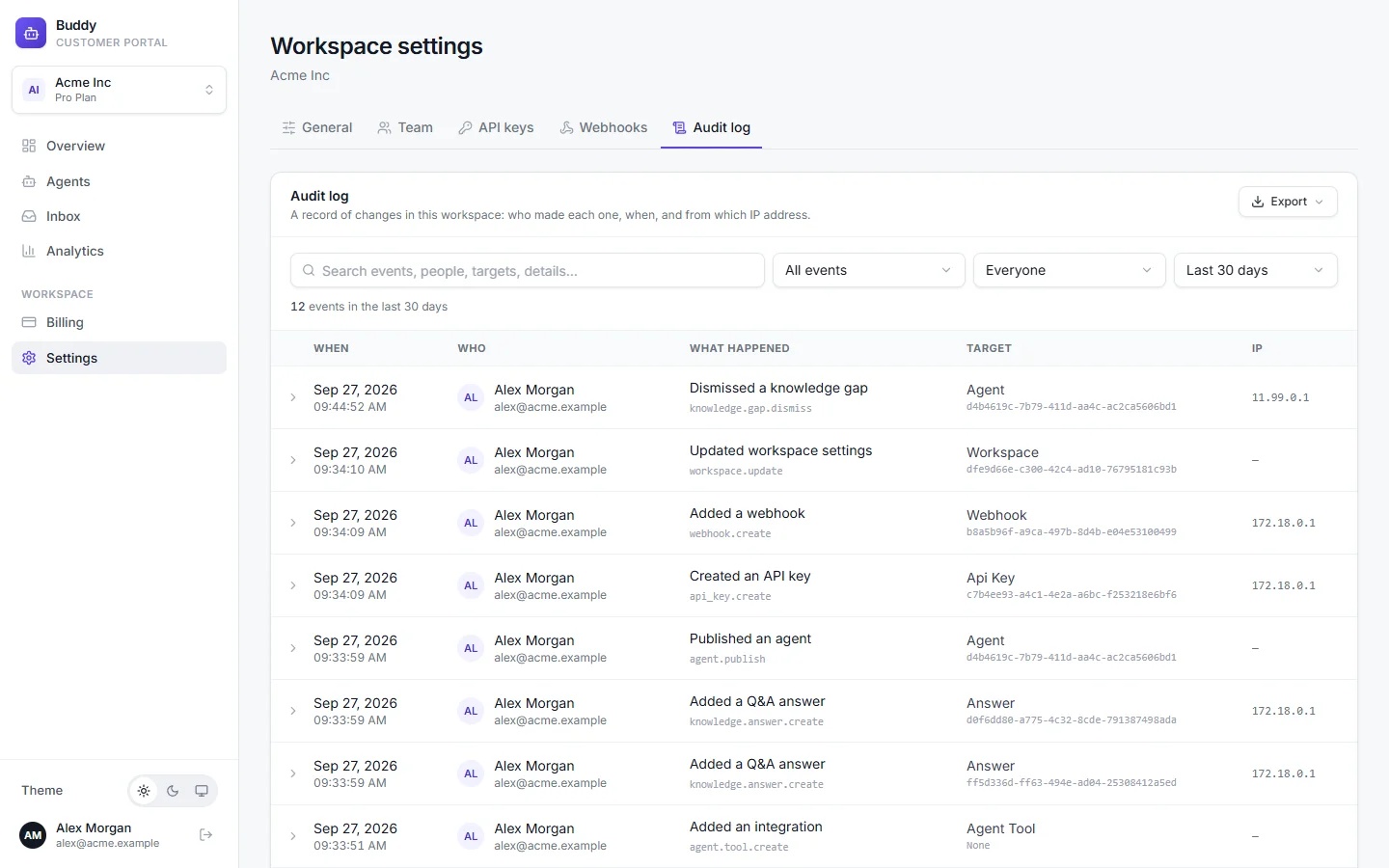
Pro Settings → Audit log records who changed what, when, and from which IP address. It covers agents, knowledge, integrations, team members, API keys, mailboxes, webhooks and privacy requests, including actions taken with API keys. Filter by event, person (Everyone, API keys, System or a member) and date range, and export up to 50,000 rows to Excel or CSV. Owners and admins can view it.
How we protect your data
- Tenant isolation. Each workspace's data is separated in the database with Postgres row-level security, in addition to checks in the application.
- Encryption of credentials. Mailbox access tokens, API action headers and webhook signing secrets are encrypted at rest.
- Hashed keys and passwords. Passwords are hashed with Argon2, and API keys are stored only as hashes, so they're shown to you once.
- No training on your data. Your content and conversations are only used to answer your customers.
For our compliance status and roadmap, see the Security page.
Troubleshooting
›The widget stopped loading after I changed the allow-list
Check the exact origin, including https:// and www. Your browser console shows [Buddy] not loaded: with the reason.
›Visitors aren't shown as verified
Make sure identify runs before the widget starts (script without async, identify right after), the token is signed with the current secret using HS256, and it hasn't expired.
›Real visitors are being blocked
Check the IP and country rules, and loosen the per-visitor limits if people legitimately send many messages. Blocked visitors see “Too many messages, please slow down” or “This assistant is not available in your region”.