Pro The REST API lets your own systems ask your agents questions, sync conversations and leads, and manage knowledge. Webhooks push events to you as they happen. This guide covers setup in the dashboard. For every endpoint and payload, see the REST API reference.
Create an API key
Go to Settings → API keys and create a key
Owners and admins can manage keys. The card also shows your API base URL and your rate limit.
Give it a Name
Something you'll recognise later, e.g. “HubSpot sync”.
Choose Permissions
Read-only, Full access or Custom scopes. Give each integration only what it needs. Scopes can't be edited later; create a new key instead.
Copy the key
Keys start with
sk_live_and are shown once. Store it in your secrets manager, then click I've saved it.
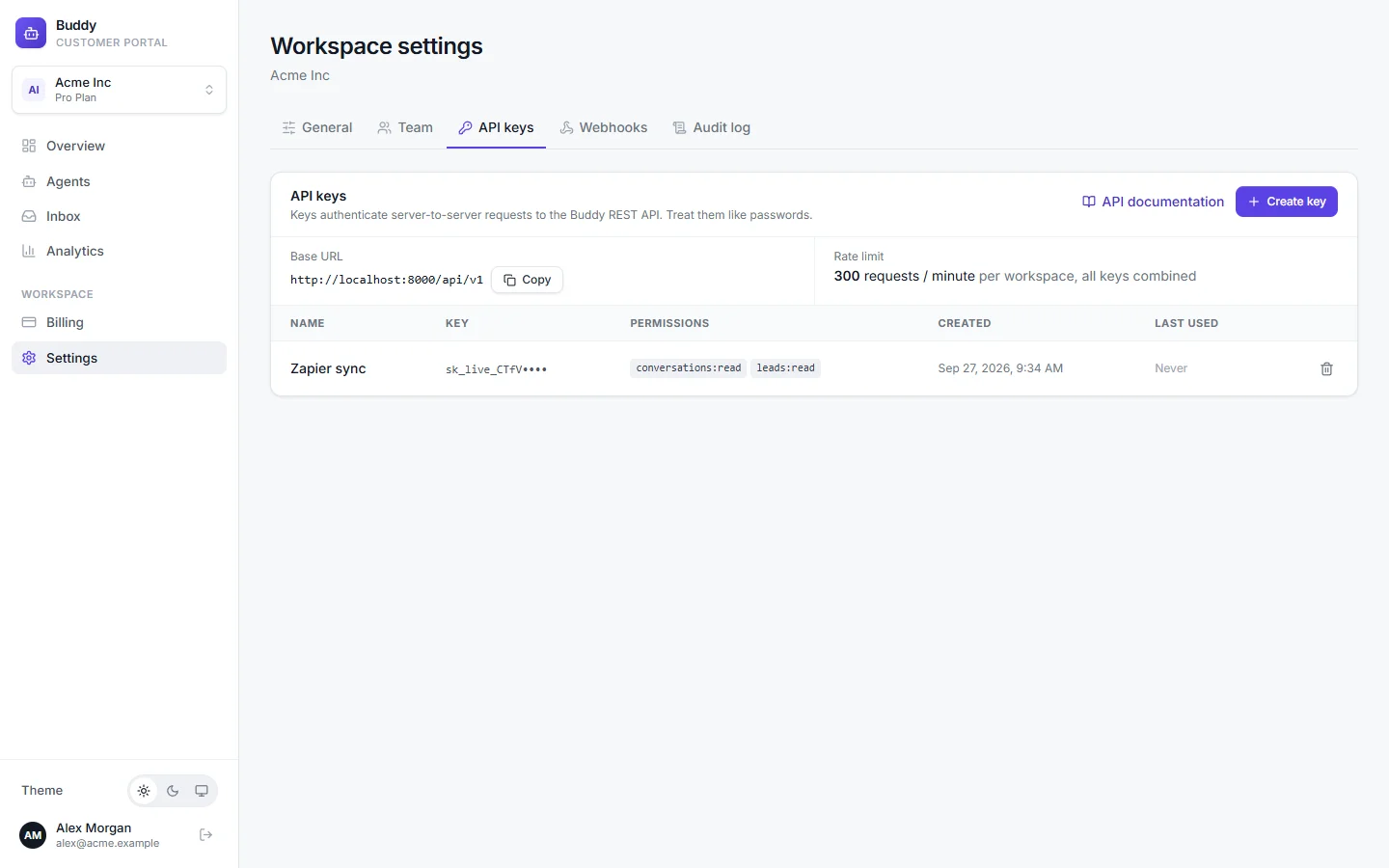
Send the key as a bearer token: Authorization: Bearer sk_live_…. All keys in a workspace share a rate limit of 300 requests per minute. To revoke a key, click revoke and confirm with Revoke key. Anything using it gets 401 errors immediately. API keys only work with the REST API, not the dashboard.
Scopes
agents:read- List agents and read their public configuration
chat:write- Send messages to an agent and receive AI answers (counts toward your message quota)
conversations:read- List conversations and read transcripts
conversations:write- Reply as a team member, resolve, reopen and tag conversations
leads:read- List contact-form submissions (leads)
knowledge:read- List knowledge sources and their sync status
knowledge:write- Add, re-sync and delete knowledge sources and Q&A answers
analytics:read- Read analytics overview metrics
usage:read- Read plan, limits and current-period usage
webhooks:write- List, create, update, test and delete webhook endpoints and read their delivery log
privacy:write- Find, export and permanently delete one end user's data (data-subject requests)
Webhooks
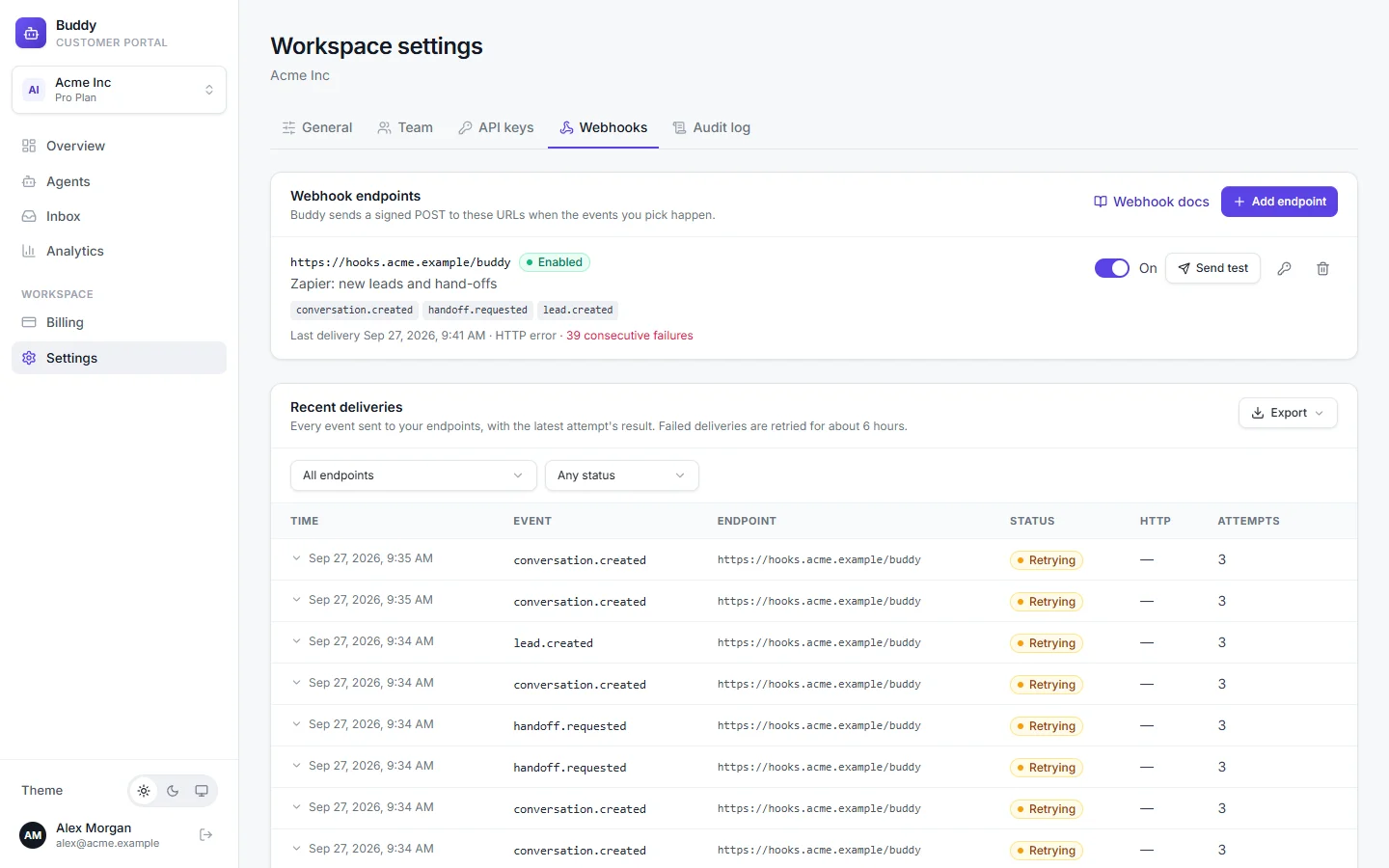
Go to Settings → Webhooks to send events to your own HTTPS endpoints. You can have up to 20 endpoints per workspace.
Click Add endpoint
Enter the Endpoint URL
It must use
https://on a public host, e.g.https://hooks.acme.example/buddy. Private and local addresses are rejected.Choose Events to send
Pick specific events, or All events, which also includes event types added later.
Copy the signing secret
It starts with
whsec_and is shown once. Use it to verify signatures (below).Click Send test
Check that your endpoint receives the test event and returns a 2xx response.
Events
conversation.created- A visitor (widget, hosted page) or the API started a conversation
message.created- The AI agent replied; includes confidence, intent and needs_human
handoff.requested- A conversation needs a human: the AI escalated, or the visitor asked or left their details
lead.created- A visitor submitted the contact form
conversation.resolved- A team member (or the API) resolved a conversation
source.completed- A knowledge source finished syncing
source.failed- A knowledge source failed to sync
Every event has the same envelope: { id, type, created_at, workspace_id, agent_id, data }. Playground chats never trigger webhooks.
Verify signatures
Each request carries Buddy-Event, Buddy-Event-Id, Buddy-Delivery and Buddy-Signature: t=<unix seconds>,v1=<hex>. Compute an HMAC-SHA256 of <t>.<raw request body> with your signing secret, compare it to v1 in constant time, and reject timestamps older than five minutes:
import crypto from "node:crypto";

// Use the RAW request body (a Buffer), not re-serialised JSON.
export function verifyBuddy(rawBody, header, secret, toleranceSec = 300) {
  const parts = Object.fromEntries(header.split(",").map((p) => p.split("=", 2)));
  const t = Number(parts.t);
  if (!t || Math.abs(Date.now() / 1000 - t) > toleranceSec) return false; // replay protection
  const expected = crypto.createHmac("sha256", secret).update(`${t}.`).update(rawBody).digest("hex");
  const a = Buffer.from(expected), b = Buffer.from(parts.v1 ?? "");
  return a.length === b.length && crypto.timingSafeEqual(a, b);
}
Verify against the raw request body, not re-serialised JSON, or the signature won't match.
Retries and auto-disable
- Respond with any 2xx within 10 seconds. Anything else is retried up to 6 attempts over about 6 hours: after 1 minute, 5 minutes, 30 minutes, 2 hours and 3.5 hours.
- The event
id(andBuddy-Event-Id) stays the same across retries, so use it to ignore duplicates. - After 50 consecutive failed attempts the endpoint is disabled and marked Auto-disabled, and the change is written to the audit log. Switch it back on to reset the count.
- Recent deliveries lists every attempt with its status, HTTP code and response. Filter by endpoint or status, Redeliver any finished delivery, and export the log.
- Use Rotate signing secret if a secret leaks. The old secret stops working immediately.
Troubleshooting
›"API access requires the Pro plan"
The REST API, API keys and webhooks are part of Pro.
›401 Unauthorized
Check the Authorization: Bearer header, and that the key hasn't been revoked. Dashboard session cookies don't work on the API, and API keys don't work in the dashboard.
›403 on one endpoint
The key is missing the scope for that endpoint. Create a new key with the right scopes.
›429 Too Many Requests
You've hit the per-workspace rate limit shared by all keys. Wait for the time in the Retry-After header, and spread requests out.
›Signatures don't match
Use the raw body bytes and the secret of this endpoint, and check your server clock (5-minute tolerance).