No knowledge base is perfect on day one. Buddy collects the questions your agent struggled with and turns them into a review queue. When you answer one, the agent uses your answer from then on. A few minutes a week keeps your agent improving.
The answer bank
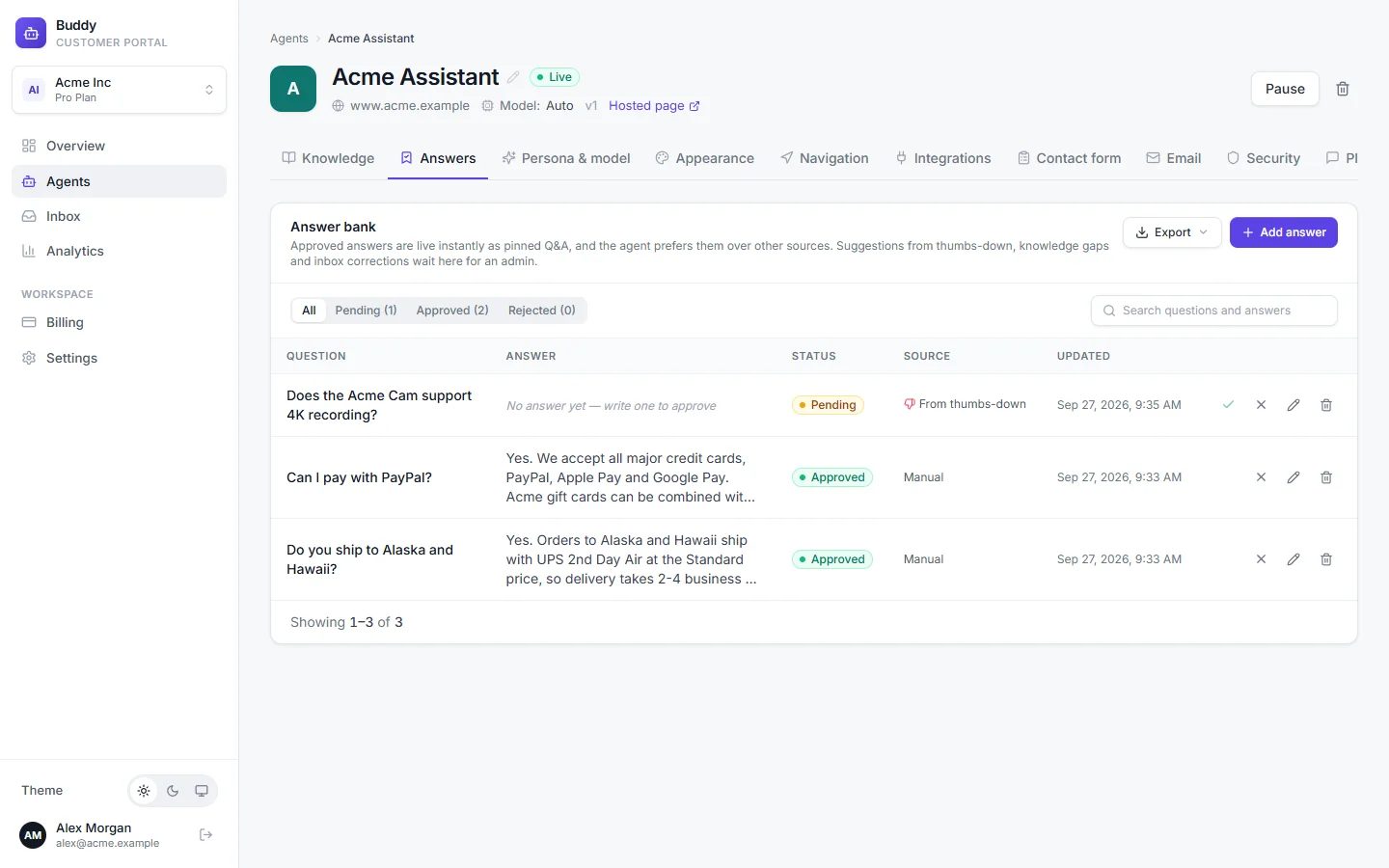
Open an agent and go to the Answers tab. The Answer bank lists question-and-answer pairs with a status:
pending- A suggestion waiting for review. The agent doesn't use it yet.
approved- Live. The agent uses it straight away and prefers it over other sources.
rejected- Not used. You can edit and approve it later.
Filter the list with All, Pending, Approved and Rejected, or search questions and answers. The Source column shows where each entry came from:
- Manual: added by someone on your team with Add answer.
- From thumbs-down: a visitor gave an answer a thumbs down. Repeat reports of the same question show a count such as “3× reported”, along with the visitor's comment.
- From knowledge gap: answered from the Knowledge gaps report (below).
- From inbox: corrected from a conversation in the inbox (below).
Review a suggestion
Click Pending to see what's waiting
Open the entry and write or fix the answer
Visitor question is how visitors ask it. Answer is what the agent should say. Suggestions from thumbs-down start with an empty answer. Write it the way you'd reply to a customer.
Click Save & approve, or Approve from the list
The answer is live immediately. To take an approved answer back out of use, click Unpublish (reject).
Approved answers are stored as pinned Q&A in the agent's Corrections knowledge source, which you'll see on the Knowledge tab. You manage them here, on the Answers tab, rather than there.
Knowledge gaps
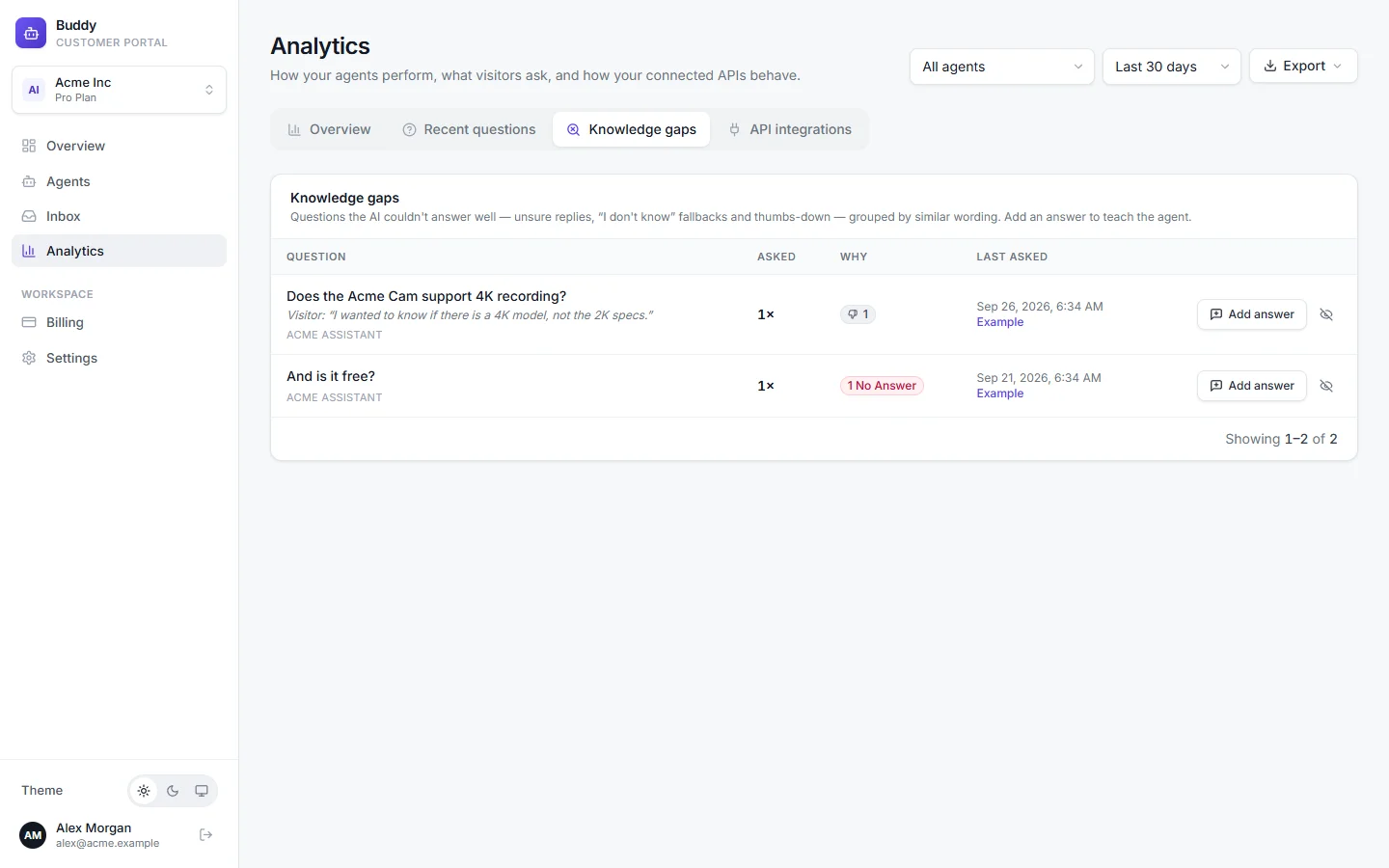
Go to Analytics → Knowledge gaps. This report collects the questions the AI couldn't answer well: unsure replies (below 50% confidence), “I don't know” fallbacks and answers that got a thumbs down. Questions with similar wording are grouped, and the most-asked groups come first. For example, “is acme cam waterproof?” and “can I use the Acme Cam outside” appear together.
- Question
- A representative question, plus similar wordings ("also: …").
- Asked
- How many times it was asked in the selected period.
- Why
- No answer (fallback), unsure (low confidence) or thumbs-down counts.
- Example
- Opens a conversation where it happened.
Click Add answer on a gap
Write the answer and save it
If you're an owner or admin, it's live right away (“Answer saved — the agent uses it from now on.”). Otherwise it goes to the answer bank for review. The gap disappears from the report either way.
Not every gap is real. For example, “what's the weather?” isn't something you need to answer. Click Dismiss (not a real gap) and those questions won't show up again.
Correct an answer from the inbox
When you spot a wrong or weak AI reply while reading a conversation, fix it on the spot. See Inbox and human takeover.
Click Correct this answer under the AI message
The question is filled in from the visitor's message, and the AI's reply is shown for reference.
Write the correct answer and save it
The message then shows Saved as answer, or Answer pending review if an admin still needs to approve it.
Replies your team wrote themselves can be reused too: click Save reply as answer on a team reply.
Weekly digest
Every Monday, owners and admins get an email summarising the week for each agent: conversations, AI replies, deflection, thumbs up and down, answers awaiting review, and up to five top unanswered questions. Answer these questions in the email takes you straight to the Knowledge gaps report. The email isn't sent for a week with nothing to report.
To turn it off for the whole workspace, go to Settings → General and switch off Weekly digest. It's on by default.
Troubleshooting
›I approved an answer but the agent still answers the old way
Approved answers can take a moment to index; the entry shows indexing… until it's ready. Then try the question in the playground and check that the answer appears under the retrieved sources. If it doesn't, word the visitor question closer to how customers ask it.
›The Knowledge gaps report is empty
Check the agent and period filters at the top of Analytics. Gaps only appear once real visitors have asked questions the agent was unsure about.