Buddy has flat monthly plans. You pay for AI messages, not seats or resolutions: one AI reply, in chat or email, is one message, whichever model answers. Crawling, navigation and your team's own replies are free.
Plans at a glance
Free
$0 / month
Try Buddy on a small site.
- 30 AI messages / month
- 1 agent
- 20 pages · 3 files
- Website widget
- “Powered by Buddy” badge
Starter
$9 / month
For a single site getting started.
- 300 AI messages / month
- 1 agent
- 100 pages · 10 files
- Weekly re-crawl
- Domain allow-list
- Lead capture
Growth
$20 / month
For growing teams that live in their inbox.
- 1,000 AI messages / month
- 3 agents · 3 team members
- Gmail or Outlook replies (1 mailbox)
- Remove the Buddy badge
- Balanced model + auto-routing
- Verified visitor identity
- Daily re-crawl
Pro
$49 / month
For agencies and teams with security needs.
- 3,000 AI messages / month + overage
- Unlimited agents · 10 team members
- 3 mailboxes + train on past emails
- IP & geo rules, PII redaction, audit log
- REST API, webhooks, scoped keys & exports
- Custom CSS · best model
Full details, the same as on the pricing page:
Usage
| Free | Starter | Growth | Pro | |
|---|---|---|---|---|
| AI messages / month | 30 | 300 | 1,000 | 3,000 |
| Overage | Message packs | $0.015 / message | ||
| Agents | 1 | 1 | 3 | Unlimited |
| Team members | 1 | 1 | 3 | 10 |
| Concurrent chats | 2 | 5 | 15 | 50 |
Knowledge
| Free | Starter | Growth | Pro | |
|---|---|---|---|---|
| Website pages | 20 | 100 | 500 | 3,000 |
| Files | 3 | 10 | 50 | 500 |
| Characters indexed | 300K | 2M | 10M | 50M |
| Re-crawl | Manual | Weekly | Daily | Daily |
| AI models | Fast | Fast | Fast · Balanced · Auto | All, incl. Best |
Channels
| Free | Starter | Growth | Pro | |
|---|---|---|---|---|
| Website widget & hosted page | ||||
| Gmail / Outlook mailboxes | 1 | 3 | ||
| Train on past emails | ||||
| Remove Buddy branding | ||||
| Custom CSS |
Security & admin
| Free | Starter | Growth | Pro | |
|---|---|---|---|---|
| Domain allow-list | ||||
| Verified visitor identity | ||||
| IP & country rules | ||||
| PII redaction | ||||
| Audit log | ||||
| REST API & scoped keys | ||||
| Event webhooks | ||||
| Daily AI spend ceiling | $1 | $2 | $5 | $20 |
Your free trial
Every new workspace gets 14 days of Growth with no card required: 1,000 AI messages, 3 agents, 3 team members and a connected mailbox. The Overview page and the Billing page show when it ends. If you don't choose a plan by then, the workspace moves to Free. Nothing is deleted, but Free limits apply. See When your trial ends.
Follow your usage
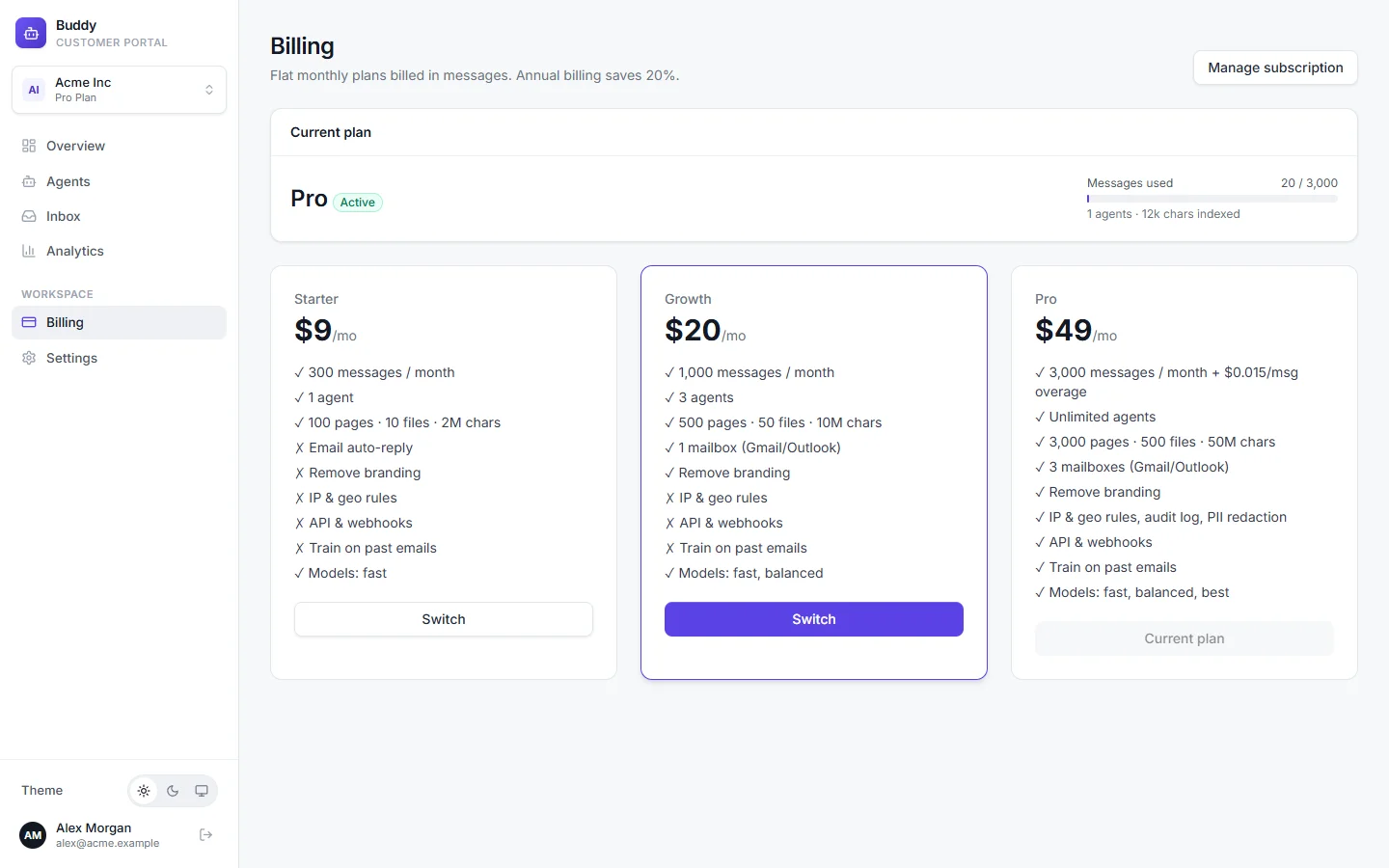
Open Billing in the sidebar. The Current plan card shows:
- Plan and status
- For example Growth, trialing, with the trial end date.
- Messages used
- AI messages this billing period against your monthly quota. Chat, email and playground replies all count.
- Totals
- How many agents you have, how many characters are indexed, and any overage messages (Pro).
The Messages this period card on the Overview page shows the same number at a glance.
When you reach your quota
- Free, Starter and Growth: your agents stop sending AI replies until the next billing period, so there's never a surprise bill. Your team can still reply from the inbox.
- Pro: your agents keep answering, and each extra message is billed as overage.
Separately, the daily AI spend ceiling protects you from sudden floods of traffic.
Add-ons
| Add-on | Price | Notes |
|---|---|---|
| Message pack | $10 per 1,000 messages | Growth · on request |
| Extra mailbox | $5 per month | Connect more Gmail or Outlook inboxes · on request |
| Extra team seat | $5 per month | Pro · on request |
| Pro overage | $0.015 per message | Keeps answering past your quota |
Add-ons marked “on request” aren't self-serve yet. Contact us to add them to your workspace.
Change your plan
Open Billing
Only the workspace owner can change the plan.
Click Upgrade or Switch on the plan you want
You'll go to a secure Stripe checkout page, where you can enter a promotion code if you have one.
Complete the payment
You'll return to Buddy with “Subscription activated. Thank you!”, and the new limits apply straight away.
On a paid plan, Manage subscription opens the Stripe billing portal, where you manage your subscription and payment details. If a subscription is cancelled or payment fails, the workspace moves to Free.
Troubleshooting
›I don't see the Upgrade buttons
Only the workspace owner can change the plan. Ask the owner to make the change.
›The agent stopped answering
Check Messages used on the Billing page. If you've reached your quota, upgrade or wait for the next period. Also check the agent isn't paused.