The Persona & model tab decides how your agent behaves: what it says about your business, its tone, what it refuses to discuss, and which AI model answers. Persona changes are part of the published version, so save, test in the playground, then click Publish changes.
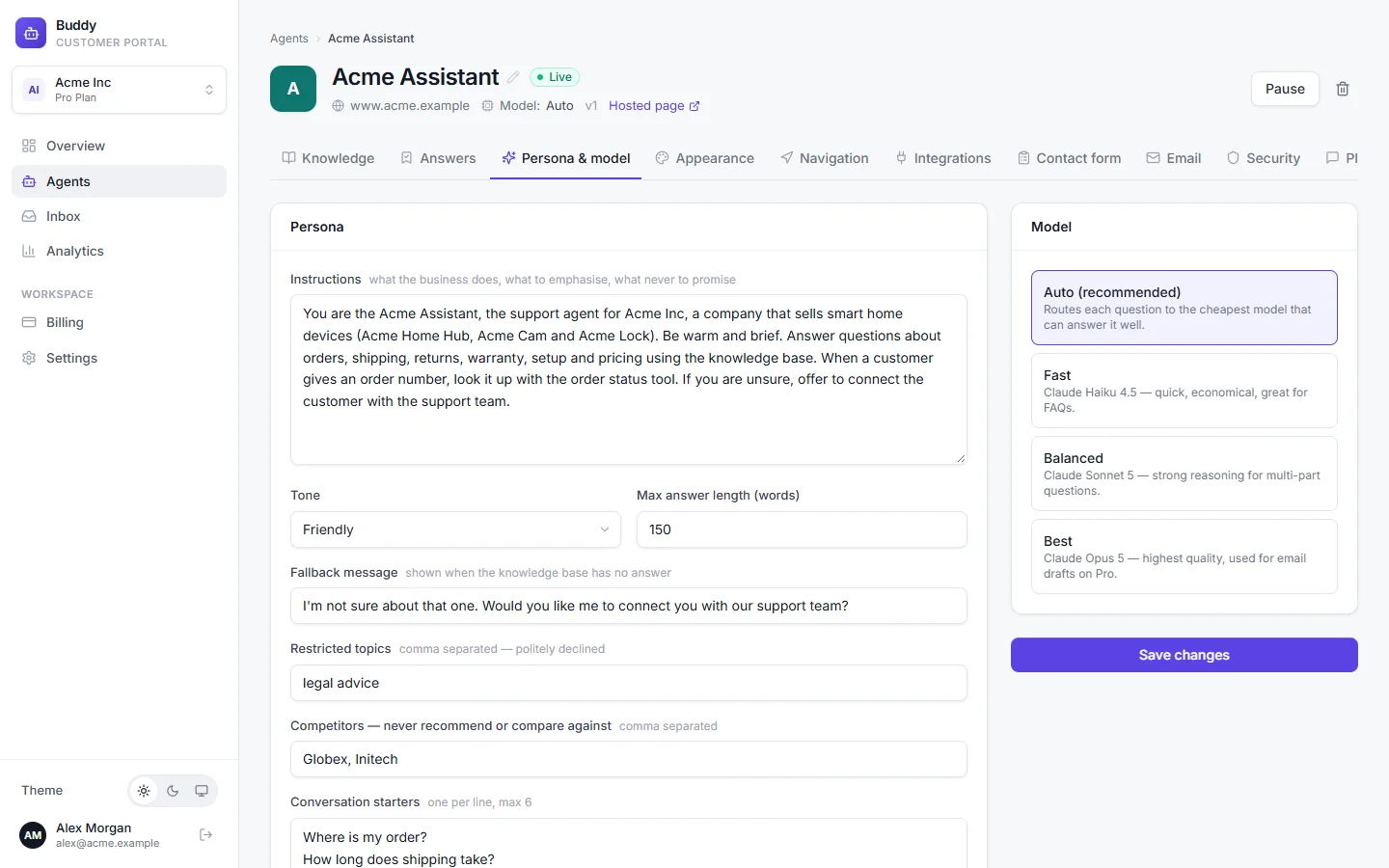
Persona settings
- Instructions
- What your business does, what to emphasise and what never to promise, in plain language (up to 6,000 characters). For example: “Acme Inc sells smart-home devices: Acme Home Hub, Acme Cam and Acme Lock. Always link to the setup guide for installation questions. Never promise delivery dates.”
- Tone
- Friendly (default), Professional, Concise or Playful.
- Max answer length (words)
- The agent keeps answers under this length. From 40 to 600, and 180 by default.
- Fallback message
- What the agent says when the knowledge base has no answer. Default: “I'm not sure about that yet. Would you like me to connect you with a human?”
- Restricted topics
- Comma-separated topics the agent politely declines, e.g. legal advice, medical advice.
- Competitors — never recommend or compare against
- Comma-separated names, up to 20, e.g. Globex, Initech. The agent won't recommend them or compare you with them.
- Conversation starters
- Up to 6 suggested questions shown when the chat opens, one per line.
Suggest conversation starters
Click Suggest from knowledge and Buddy writes four short starters from your FAQs and documents, for example “How do I reset my Acme Lock?”. They replace what's in the box but aren't saved yet: review them, then click Save changes. This needs some knowledge first. With none, you'll be asked to add a website, files or FAQs.
Guardrails
- Only answer from the knowledge base
- On by default and recommended. When the agent can't find a confident answer in your knowledge, it sends your fallback message instead of guessing, and offers the contact form if you've enabled it.
- Show sources
- Adds numbered citations and source links under answers. Off by default, which keeps answers plain.
- Auto-navigate after 1.5s
- When the agent suggests a page, it opens it automatically instead of showing a button. See Page navigation.
Languages
Visitors can write in their own language and the agent replies in it, even if your content is in English. There's nothing to set up, and there's no language setting in the dashboard.
Learned writing style
If you've imported past emails on Pro, a Learned writing style (from email history) card shows the tone profile Buddy derived from your sent replies. See Train on past emails.
Save and publish
Click Save changes
You'll see “Saved. Publish the agent to push changes live.”
Test on the Playground tab
The playground uses your draft.
Click Publish changes in the header
Choose the AI model
The Model card offers four tiers. Tiers your plan doesn't include are disabled and marked upgrade.
- Auto (recommended)Growth+
- Routes each question to the cheapest model that can answer it well: simple questions to Fast, harder ones to a stronger tier.
- Fast
- Quick and economical. Great for FAQs.
- BalancedGrowth+
- Stronger reasoning for multi-part questions.
- BestPro
- The highest quality. Also used for email drafts on Pro.
| Free | Starter | Growth | Pro | |
|---|---|---|---|---|
| AI models | Fast | Fast | Fast · Balanced · Auto | All, incl. Best |
Every message counts as one message whichever tier answers, so there are no model multipliers. If an agent is set to a tier your plan doesn't include, for example after a downgrade, Buddy uses the best tier your plan allows.
Low-confidence escalation
On Auto, Buddy also steps up one tier by itself when the knowledge it found only weakly supports the answer, for example from Fast to Balanced, within your plan's tiers. A tier you pick yourself is never changed. If the AI still isn't confident, the conversation can be handed to your team. See Contact form and handoff.
Troubleshooting
›The agent ignores my new instructions
Persona changes need publishing. Look for Unpublished changes and click Publish changes. The playground shows the draft, the website shows the published version.
›The agent answers "I'm not sure" too often
That's the fallback, so the knowledge base didn't have a confident match. Add the missing content, or answer the questions in Knowledge gaps, rather than switching off Only answer from the knowledge base.
›Answers are too long or too short
Adjust Max answer length (words), or try the Concise tone.